AVG AntiVirus & Security
AVG MobileTools
4.6309.50K Reviews
- Version
- 26.18.0.261002870
- Installs
- 100.00M
- Age Rating
- Everyone
Screenshots
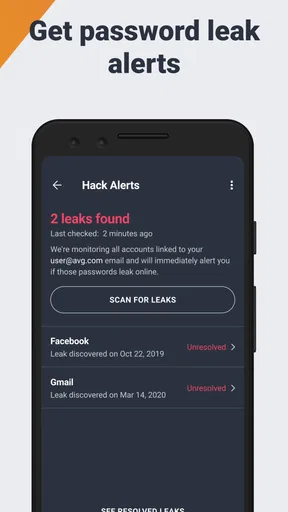
Our Review of AVG AntiVirus & Security
 Analysis by Appyee
When I judge a phone security app, I care less about a crowded feature list than whether it helps me make safer choices without turning everyday phone use into a chore. AVG AntiVirus & Security gets that balance mostly right: it brings scanning and privacy tools together in a familiar interface, though some extras deserve a skeptical look rather than automatic trust.
Where it fits among phone security tools
AVG AntiVirus is a free tools app from AVG Mobile, and its appeal is straightforward: it gives people who want a visible security dashboard a place to check their device and access several protective features. With an average rating of 4.6 from around 7.9 million ratings and more than 100 million installs, it is clearly a familiar option for Android users. Its current version is 25.22.0, and it is listed for Android 9 and later.
I would compare it less with a full desktop security suite and more with the security tools already built into a phone. Built-in protections can be enough for someone who installs apps cautiously and rarely changes settings. AVG makes sense if you prefer an extra place to run checks, review privacy tools, and get reminders about possible risks. It is not a substitute for careful habits, and I would not install it expecting any security app to make suspicious links or downloads harmless.
The app is free to download, but in-app purchases range from $0.99 to $119.99 per item. That matters if you only want a basic check: I would explore the free experience first and decide whether any paid option solves a real need before buying. The Everyone age rating makes it broadly accessible, but younger users should still have an adult help them understand what app locks, photo storage, and purchase prompts mean.
Getting Started with AVG AntiVirus & Security
First things first, downloading and installing AVG AntiVirus & Security is a breeze. Just head to the Play Store or App Store, search for AVG, and you're good to go. The app itself is lightweight, so it won’t gobble up your phone's storage space. Once installed, it walks you through a quick setup process that's straightforward even if you're not a tech whiz.
User Interface and Experience
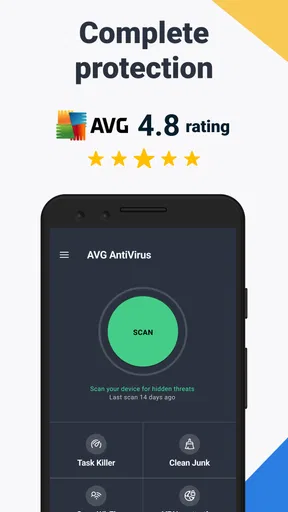
The interface is clean and intuitive, which is a big win in my book. The home screen gives you a neat overview of your phone’s security status. It’s like having a little security guard inside your phone. You’ll find all the essential features like scanning, boosting, and protecting your device right at your fingertips.
One thing I really appreciate is the minimalistic design. It’s not cluttered with unnecessary buttons or confusing jargon. Even if you’re not a tech-savvy person, you’ll find navigating through the app a piece of cake.
Security Features Galore
This is where AVG really shines. The app offers a variety of security features that cater to all your needs. The antivirus scanner is robust and thorough. It scans apps, games, settings, and files in real-time to ensure your device stays clean. Plus, it updates its virus definitions regularly, keeping you safe from the latest threats.
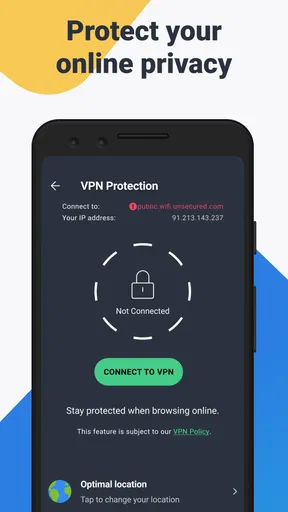
Another feature worth mentioning is the Wi-Fi Security Scan. It checks your connected networks for potential security issues, which is super handy if you often connect to public Wi-Fi. After all, you never know who could be snooping around on unsecured networks.
A more useful way to work the scanner
I get the most value from a security scan when I use it as a checkpoint, not as a ritual. After installing an app from outside my usual routine, changing a device setting, or connecting to a network I do not recognize, a deliberate check can help me review the phone instead of relying on a vague sense that everything is fine. I would avoid repeatedly scanning just to chase a reassuring green status; that can make the dashboard feel more authoritative than it really is.
The Wi-Fi check is best treated as a prompt to think, not a guarantee that a connection is safe. If I am working with sensitive accounts on public Wi-Fi, I still avoid unfamiliar sign-in pages and take care with what I open. A network assessment can flag concerns, but it cannot tell me that every site, message, or person using that network is trustworthy.
For someone who shares a phone with a family member, the scanner and privacy tools can serve different purposes. A scan is about checking the device; App Lock is about controlling access to selected apps. Keeping those jobs separate helps set realistic expectations: locking an app does not remove threats from it, while a clean scan does not stop another person from opening something I left unlocked.
Privacy Protection
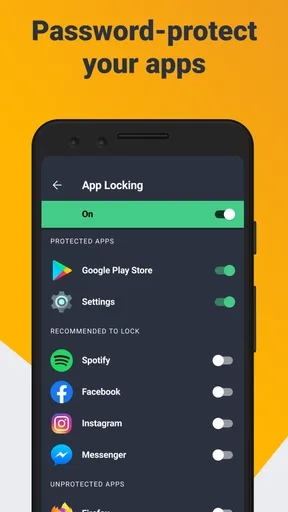
AVG doesn’t just stop at security; it also takes your privacy seriously. The App Lock feature allows you to lock sensitive apps with a PIN, pattern, or fingerprint. This means you can lend your phone to friends or family without worrying about them snooping through your private stuff.
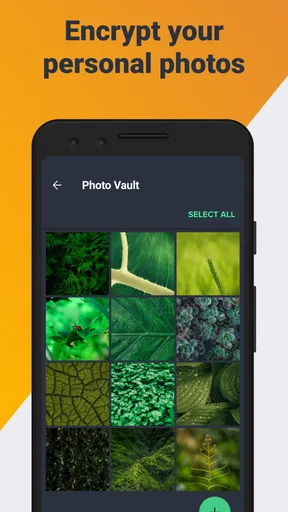
Then there’s the Photo Vault. It securely encrypts your photos, keeping them safe from prying eyes. It’s like having a digital safe for your most cherished memories.
Making the privacy tools practical
App Lock is most useful when I choose a small number of apps that would genuinely bother me if someone opened them while borrowing my phone. Locking everything can add friction each time I switch tasks, so I would start with the obvious private apps and see whether the extra step feels worthwhile. It is a convenience and privacy layer, not a reason to share an unlocked device casually.
A Photo Vault also changes how I manage pictures: I would move only the images I specifically want kept out of the ordinary gallery, then check that I can still find and access them when needed. A vault is valuable only if it fits the way I already organize photos. Before relying on it for irreplaceable images, I would make sure I understand how I can recover them if I lose access to the phone or the app.
That trade-off is especially relevant for people who frequently lend their phone to children or relatives. A lock can reduce accidental browsing, but it will not replace a conversation about what the borrower is allowed to use. If I am setting up a device for someone else, I would combine selective locking with the phone’s own account and screen controls rather than treating one app as a complete family-safety setup.
Performance and Battery Life
Now, you might be wondering if having an antivirus app will slow down your phone. Luckily, AVG is quite efficient. It runs smoothly in the background without hogging your device’s resources. As for battery life, I didn’t notice any significant drain, which is always a concern with security apps.
What I would watch during everyday use
Even when an app feels light, security software is another service running on a phone, so I would pay attention to whether alerts and background activity suit my habits. If I notice that the app is interrupting tasks or prompting me more than I find useful, I would review its settings and keep only the protections I actually use. The point is not to disable safeguards blindly; it is to avoid treating every notification as an emergency.
That is one reason I would not recommend adding AVG automatically to every phone. People who already rely on built-in protections, keep their software current, and install only trusted apps may gain little from maintaining another dashboard. Someone who wants an extra, approachable set of checks is more likely to appreciate it.
Extra Features
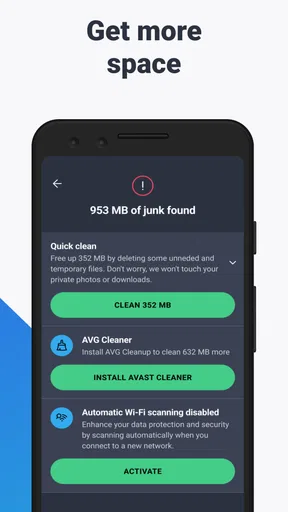
AVG AntiVirus & Security also throws in some handy extras. The Junk Cleaner helps keep your device tidy by removing unnecessary files. There’s also a RAM Booster that aims to speed up your phone by killing background apps. While these aren't groundbreaking features, they’re nice to have as part of the package.
And let's not forget the Anti-Theft feature. If your phone goes missing, you can track it via the AVG website, remotely lock it, and even wipe its data if necessary. It’s a comforting safety net for those "just in case" moments.
When the extras help—and when they do not
I would use a cleaner cautiously and review what it proposes to remove instead of treating every file marked as clutter as disposable. A tidy-up tool can be convenient when storage is tight, but deleting items without checking them can create its own annoyance if I later need something it removed. The same restraint applies to the RAM Booster: closing background apps may sound like an easy speed fix, but I would not make it a routine button press without a clear problem to solve.
For a missing phone, the most useful anti-theft preparation happens before anything goes wrong. I would check that I know how to reach the remote controls and that I can sign in to the relevant account from another device. Remote locking or wiping is a last-resort response, not a substitute for keeping a separate copy of important files. I would think through that recovery trade-off before relying on a wipe option.
A realistic use case is a commuter who checks email and messages on public networks, occasionally lends a phone to a family member, and wants a simple place to review security. They could use the network check when joining unfamiliar Wi-Fi, lock a private messaging app before handing over the device, and keep selected photos in the vault. Those are concrete, separate jobs; none requires running every extra tool every day.
Who should choose it
I think AVG is a good fit for Android users who want visible, approachable tools rather than a security setup that feels technical. It is especially suitable for someone who shares a device, wants a dedicated photo vault, or regularly connects to networks outside home. The large user base and strong average rating suggest that many people find the package useful, but popularity alone should not decide whether it belongs on your phone.
I would skip it if you want nothing beyond the phone’s built-in protections, dislike security notifications, or are mainly looking for a guaranteed speed boost. It is also not the right answer to risky browsing habits: no scanner can make every link safe, and an app lock cannot protect information you willingly enter into a fraudulent page. If your priority is simply basic device hygiene, the built-in settings may be a cleaner, lower-friction choice. If you want a broader collection of checks and privacy tools in one app, AVG is easier to justify.
Final Thoughts
All in all, AVG AntiVirus & Security is a solid choice for anyone looking to beef up their phone's defenses. It’s packed with features that cover all the bases, from security to privacy and even a bit of performance boosting. The app is easy to use, doesn’t slow down your device, and offers peace of mind in a digital age where threats are ever-present.
If you're in the market for a reliable antivirus app, I’d say give AVG a shot. It’s like having a personal bodyguard for your phone, and who wouldn’t want that?
My recommendation comes with one condition: use the features that solve a real problem for you, and do not confuse a reassuring dashboard with perfect protection. I would start with the scanner and whichever privacy tool fits my routine, then decide whether the cleaner, booster, and anti-theft options earn a place in regular use. That keeps the experience focused instead of turning security into another source of phone clutter.
Privacy and Permissions
See what permissions an app requests and how it handles your data.
- Identity
- find accounts on the device, add or remove accounts
- Contacts
- find accounts on the device, read your contacts
- Location
- approximate location (network-based), precise location (GPS and network-based)
- SMS
- read your text messages (SMS or MMS), receive text messages (SMS)
- Phone
- reroute outgoing calls, read call log, read phone status and identity
- Photos/Media/Files
- access USB storage filesystem, read the contents of your USB storage, modify or delete the contents of your USB storage
- Storage
- read the contents of your USB storage, modify or delete the contents of your USB storage
- Camera
- take pictures and videos
- Wi-Fi connection information
- view Wi-Fi connections
- Device ID & call information
- read phone status and identity
- Other
- view network connections, create accounts and set passwords, connect and disconnect from Wi-Fi, measure app storage space, full network access, close other apps, run at startup, reorder running apps, draw over other apps, use accounts on the device, prevent device from sleeping, install shortcuts, uninstall shortcuts, Google Play license check
Verdict
Strengths of AVG AntiVirus & Security
- Comprehensive malware protection.
- Real-time scanning is efficient.
- User-friendly interface design.
- Includes anti-theft features.
- Regular updates enhance security.
Limitations of AVG AntiVirus & Security
- Free version has limited features.
- Occasional ads in the free version.
- Can slow down older devices.
- Some features require in-app purchases.
- Initial setup can be time-consuming.
Other Releases by AVG Mobile
View All
AVG Cleaner – Storage Cleaner
Productivity4.6

AVG Secure VPN Proxy & Privacy
Tools4.3
Similar Picks in This Category
View All
Google LLC4.0

Gboard - the Google Keyboard
Google LLC4.5

Google Play services
Google LLC4.3

Google Play Store
Google LLC4.9

Files by Google
Google LLC4.5

SHAREit: Transfer, Share Files
Smart Media4U Technology Pte.Ltd.4.3
You May Also Like
View All
Frequently Asked Questions
What features does AVG AntiVirus & Security offer on mobile devices?
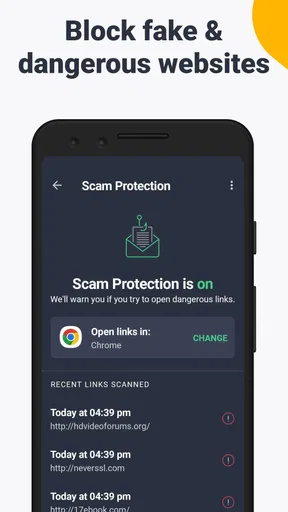
AVG AntiVirus & Security provides comprehensive protection for your mobile device, including virus and malware scanning, real-time threat detection, app lock, and Wi-Fi security. It also offers anti-theft features like device tracking, remote lock, and data wipe. Additionally, users benefit from an enhanced privacy policy and performance optimization tools.
Is AVG AntiVirus & Security free to use, or does it require a subscription?
AVG AntiVirus & Security offers a free version with essential features. However, for advanced protection like VPN access, app lock, and more detailed anti-theft options, a subscription to the premium version is required. Subscriptions can be monthly or annual, often with a free trial period available for new users.
How does AVG ensure the privacy and security of my data?
AVG prioritizes user privacy by implementing strict data protection policies. The app uses advanced encryption to safeguard your information and offers tools like app lock and photo vault to keep personal data secure. AVG also regularly updates its security protocols to address potential vulnerabilities and threats.
Will AVG AntiVirus & Security affect my device's performance or battery life?
While AVG AntiVirus & Security runs in the background to provide real-time protection, it is optimized to minimize impact on device performance and battery life. The app includes performance-enhancing tools designed to optimize your device's speed by clearing unnecessary files and managing background processes efficiently.
How effective is AVG AntiVirus & Security in detecting and removing threats?
AVG AntiVirus & Security is highly effective in detecting and removing a wide range of threats, including viruses, malware, spyware, and phishing attacks. The app uses a robust threat-detection engine that is regularly updated to identify new and emerging threats, ensuring comprehensive protection for your device.
